
Short answer: At $100,000 or more a month on Google Ads, Performance Max and Search do different jobs and should not compete for the same buyer. Search, with broad match and a clear keyword list, catches people who already know what they want and shows you every query. Performance Max finds new buyers across Shopping, YouTube, Display, Discover and Gmail, but by default it will also buy your own brand searches, send traffic to any page on your site and report a return that partly belongs to customers you already had. Fix three things before you raise the budget: exclude your brand from Performance Max and run brand in its own Search campaign, control URL expansion so only selling pages get traffic, and read the search terms every week. Then report brand and non-brand separately and move budget up one step at a time, only when non-brand cost per sale holds.
This guide is for teams spending $100,000 or more a month across paid media, with Google as the largest or second largest channel, who want to spend more on it and cannot see why the next step costs so much. It covers the questions we answer on almost every Google Ads audit: Performance Max or Search, how much of the result is your own brand, where URL expansion sends people and what a safe way to scale looks like. If your conversion data is not trusted yet, start with server-side tracking before you scale, because everything below depends on Google learning from real sales.
What we hear about Google Ads on growth strategy calls
In 222 growth strategy calls with founders and marketing leaders, the Google doubts sound alike:
- “What they proposed is just another black box.”
- “Most of our traffic and leads come only from brand keywords.”
- “The Google numbers and the back-end data is not matching, so what’s working good in Google actually is not working in the back-end.”
- “Competitors started raising their bids significantly to get not only larger impression share but top position.”
The audit findings behind them repeat from account to account. Performance Max bidding on the brand with no brand exclusions, on a grocery delivery account, a funeral services business and an online store. URL expansion sending shoppers to job postings and to pages in the wrong language for the market. 109 search terms with zero conversions that had spent close to 10,000 euros on one e-commerce account. A brand campaign on a return target that lost a quarter of its own brand searches because the bids were too low. A Dynamic Search Ads campaign and a Search campaign buying the same keywords against each other. None of these needs a new strategy. They need someone to look.
Performance Max vs Search: what each one is for
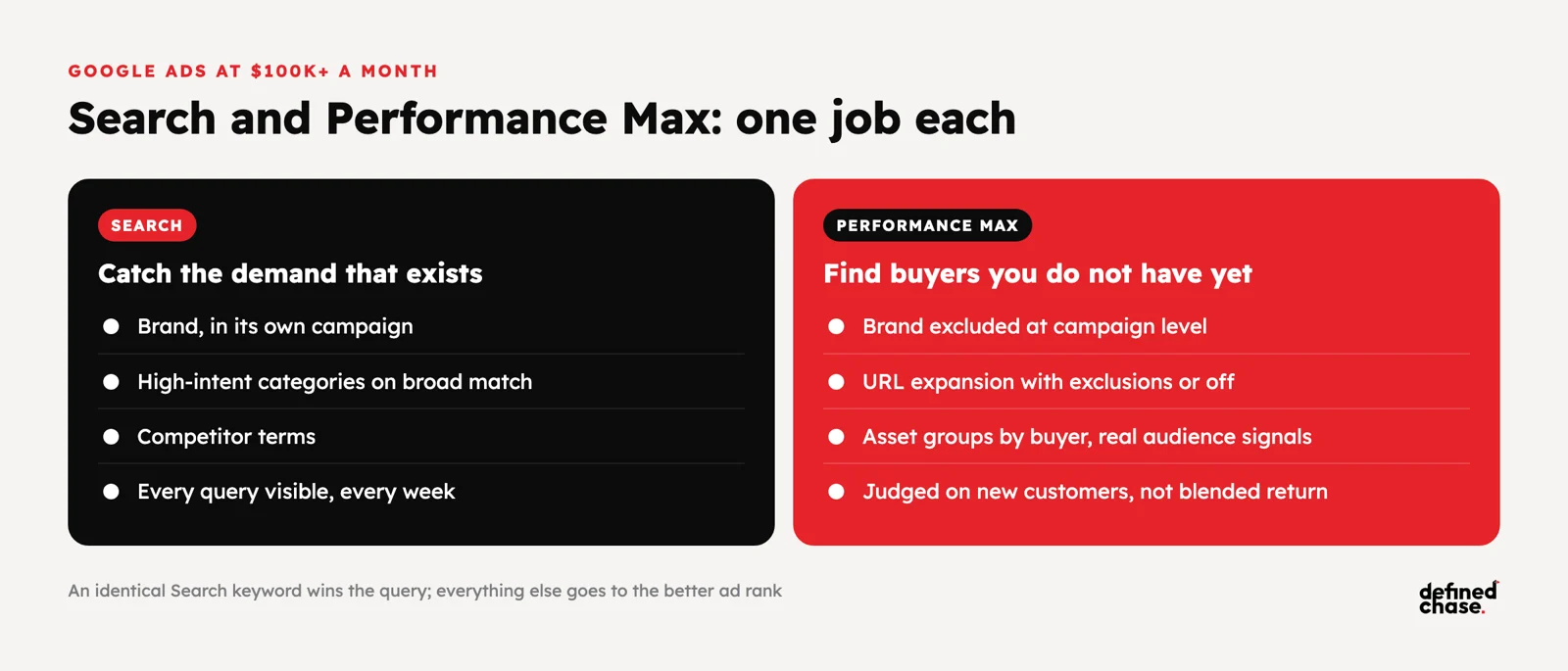
The question is rarely “which one”. At this budget most accounts need both, with a clear line between them. Search is where you control the query and see it. Performance Max is where Google finds demand you would not have found with keywords, in exchange for less control and less visibility.
| Question | Search (with broad match) | Performance Max |
|---|---|---|
| Best at | People already searching for what you sell, your brand and your competitors | New buyers across Shopping, YouTube, Display, Discover, Gmail and Maps |
| What you control | Keywords, match types, negatives, ad copy, landing page per ad group | Assets, audience signals, product feed, final URLs, brand and keyword exclusions |
| What you see | Every search term, by keyword | Search term insights and channel reports, with less detail per query |
| Main risk | Too many small campaigns, too little data in each | Buying your brand and your existing customers, then reporting it as new revenue |
| Use it for | Brand, high-intent categories, competitor terms, new markets with low data | Scaling e-commerce catalogues, finding new audiences once tracking and feeds are clean |
| Report it on | Cost per new customer by keyword theme | Non-brand cost per new customer and new customer share, not blended return |
When the same search term matches both, Google gives priority to a Search keyword that is identical to the query. Everything else goes to whichever campaign has the better ad rank, which is why overlap between the two is common and why brand traffic drifts into Performance Max unless you stop it.
Brand cannibalisation: when Performance Max buys your own customers
Brand searches are the cheapest conversions in any account. People who type your name were going to buy anyway, so whichever campaign catches them looks brilliant. When Performance Max catches them, its return goes up, the account average goes up, and nobody sees that the non-brand part is barely breaking even.
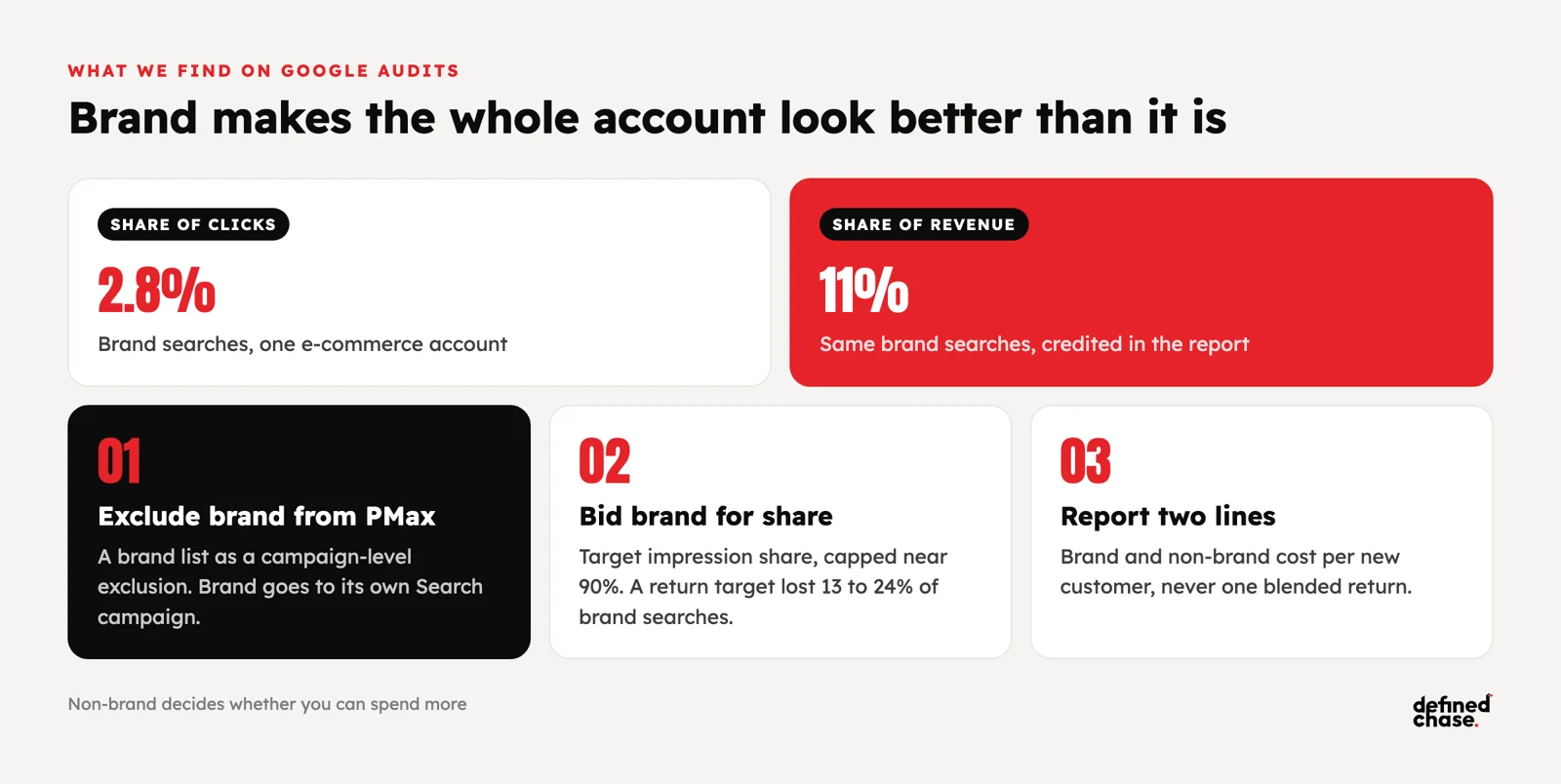
On one e-commerce account, brand searches were 2.8% of clicks and 11% of revenue. Blended across the account, the return looked healthy. Split out, non-brand was much weaker, and that is the part that decides whether you can spend more. On another account, Performance Max was taking brand traffic because there were no brand exclusions; once brand was excluded and moved to its own campaign, Performance Max had to prove itself on new buyers.
How to stop it:
- Brand exclusions in Performance Max. Create a brand list in Google Ads and exclude it at campaign level, so brand searches go to your brand Search campaign.
- One brand Search campaign. Exact and phrase brand terms, its own budget, and competitor names kept out of it. One grocery account had a competitor’s name inside its brand campaign.
- The right bidding for brand. A brand campaign on a return target often bids too low and loses its own searches; one account lost about 13% to 24% of brand impression share this way. Use target impression share or maximise clicks with a cost cap, and cap impression share around 90% instead of paying for the last few percent. We have seen brand at 96% impression share, which usually costs more than it brings.
- Report brand separately. Brand spend, brand revenue and non-brand cost per new customer on separate lines. See the one-page CEO marketing report for the layout.
- Test how much brand you need to buy. If competitors do not bid on your name, a holdout test (brand paused or reduced in some regions or weeks) shows how much organic search would pick up. Read incrementality and marketing mix modeling before you run one.
URL expansion: where Google sends your traffic
Final URL expansion lets Performance Max, and now AI Max for Search, send people to any page on your domain it thinks fits the query better than the URL you chose. On a clean site with strong product and category pages, that can help. On most sites it also means blog posts, career pages, help articles, out-of-stock products and pages in the wrong language.
On audits we have found Performance Max traffic landing on job postings, on blog posts, and on pages in another country’s language for the market being targeted. One brand campaign pointed at a URL that redirected to another version of the domain, and Google Analytics counted those clicks as organic and direct traffic instead of paid. Each of these makes the conversion rate worse and the reports less reliable.
| Check | What to do | Why it matters |
|---|---|---|
| Is URL expansion on? | Decide per campaign. Turn it off for lead generation and narrow sites; keep it with exclusions for large catalogues | Default settings decide where your budget lands |
| URL exclusions | Exclude careers, blog, help, legal, login, other-language folders and pages that never sell | Stops paid traffic on pages that cannot convert |
| Page feeds | Give Google a list of the pages you want used, grouped by label | Turns expansion into a choice instead of a guess |
| Final URLs | Point every ad at the final page, with no redirect in between | Faster pages and correct attribution in analytics |
| Landing page report | Review pages by spend and conversion rate every month | Catches the pages expansion added after setup |
The search terms nobody reads
At $100,000 a month, wasted search terms are rarely a small leak. One e-commerce account had 109 search terms with zero conversions and another 44 with very poor efficiency, together a large share of the Search budget, plus 62 terms that sit on most standard negative lists. A travel account had 35 search terms with no sales after 683 euros of spend and 54 more that sold at above-average cost. A smaller account spent 500 to 600 euros a month on terms with very poor conversion rates. The fix is not glamorous: a weekly review, shared negative lists at account level, and a rule for what gets excluded.
- Weekly, not quarterly. Review search terms every 3 to 7 days on large accounts. Add weak queries as negatives; promote strong ones into their own keyword or asset group.
- Account-level negatives. Words like “free”, “used”, “jobs” and “login” apply to Search and Performance Max at once. Use shared lists instead of copying negatives into each campaign.
- Broad match with good signals. Many accounts still run on exact and phrase keywords split into dozens of small ad groups. With reliable conversion data, fewer campaigns on broad match usually learn faster; without it, broad match buys junk.
- No two campaigns on the same query. Search, Dynamic Search Ads, page feed campaigns and Performance Max should not bid against each other. One account turned off a page feed campaign because it was taking search terms from the others.
- Placements. Exclude mobile game apps and children’s content from Performance Max and Display where your account allows it. Accidental clicks there look like cheap traffic and never buy.
Performance Max setup that scales
Most Performance Max campaigns we audit were set up once and left alone. The common pattern is one asset group per campaign, built around products instead of buyers, with no audience signals and weak assets. One grocery account had an audience segment that drove 75% of conversions and was not used as a signal at all.
- Asset groups by buyer, not by product. Separate groups for the main customer types or use cases, each with its own headlines, images and video.
- Real audience signals. Customer lists, past converters and the segments that already convert, not just interests.
- A clean feed for e-commerce. Titles, descriptions and product types that match how people search, with custom labels for margin and best sellers.
- New customer goals where it fits. Bid more for new customers or report new customer share, so Performance Max is not paid for repeat buyers.
- Creative refreshed on a schedule. Visual assets wear out. On one account the image assets brought the most expensive conversions; new video and images fixed more than bid changes did. See the creative testing playbook.
How to scale Google Ads past $100K a month
Scaling Google is a budget ladder, not a single jump. In our planning deck for Demand Gen and Performance Max, each spend level has a target cost per sale and a fixed split, and the rule is simple: we only move to the next level when the trailing cost per sale is at or under target.
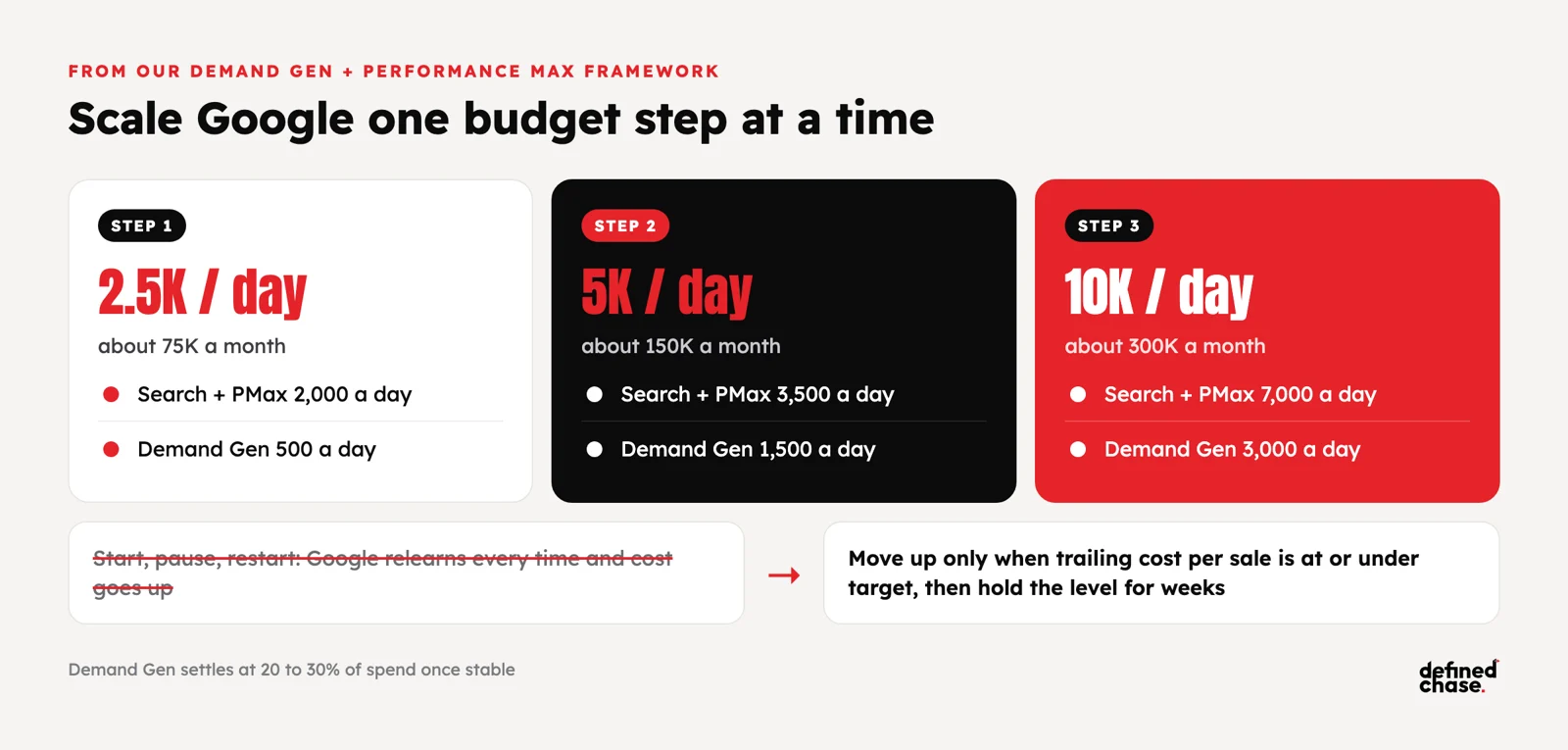
| Daily spend | Monthly | Search + Performance Max | Demand Gen | Move up when |
|---|---|---|---|---|
| 2,500 a day | About 75,000 | 2,000 a day | 500 a day | Trailing cost per sale at or under target |
| 5,000 a day | About 150,000 | 3,500 a day | 1,500 a day | Same rule, with creative and landing pages keeping up |
| 10,000 a day | About 300,000 | 7,000 a day | 3,000 a day | Demand Gen holds 20 to 30% of spend once stable |
Two lessons from running it. First, start and stop kills learning: a small budget that is paused, restarted and paused again sends Google back into learning each time and usually raises the cost when it restarts. Pick a level you can hold for weeks. Second, the search side tells you where the headroom is. On a B2B machinery account Google showed our ads on only about 26% to 50% of the eligible searches, so roughly double the spend was there to take before any new channel was needed. Impression share lost to budget is the first place to look; impression share lost to rank means the ads or pages need work first. For why the next step always costs more, see why customer acquisition cost rises when you scale.
A 30-day Google Ads clean-up order
Do it in this order. Each step makes the next one easier to read.
| Week | Fix | Result you should see |
|---|---|---|
| Week 1 | Conversion tracking checked against the backend; one primary goal per campaign; enhanced conversions on | Google learns from real sales, not from page views or duplicates |
| Week 2 | Brand exclusions in Performance Max; one brand Search campaign; brand reported separately | A true non-brand cost per new customer |
| Week 3 | URL expansion settings and exclusions; final URLs without redirects; search term clean-up and shared negatives | Less spend on pages and queries that never sell |
| Week 4 | Asset groups by buyer, audience signals, feed fixes; budget ladder and the rule to move up written down | A plan to raise spend one step at a time |
How we run it at Defined Chase
We start Google accounts with an audit of what is already there: tracking against the backend, brand versus non-brand, Performance Max overlap, URL expansion, search terms and impression share lost to budget and to rank. Brand goes into its own campaign and its own line in the report, Performance Max is judged on new buyers, and budget moves up one level at a time on a written rule, next to Meta, YouTube and DV360 when those are the next step. One owner reads a weekly scorecard across every channel. See how we run Google Ads for brands spending $100K+ a month, or book a free Growth Map Call to find what is capping your Google spend.
FAQ
Is Performance Max better than Search?
Neither is better on its own. Search is better for brand, high-intent and competitor queries where you want control and visibility. Performance Max is better for finding new buyers across Google’s channels, especially for e-commerce catalogues. Most accounts at $100K+ a month run both with a clear split.
Does Performance Max cannibalise brand search?
Often, yes. Without brand exclusions, Performance Max will serve on your brand searches and claim those sales. Add a brand list as a campaign-level exclusion, run brand in a separate Search campaign and report brand and non-brand separately.
Should I turn off URL expansion in Performance Max?
For lead generation and small sites, usually yes. For large e-commerce catalogues, keep it but exclude careers, blog, help, legal and other-language pages, and use page feeds to tell Google which pages to use.
Can I add negative keywords to Performance Max?
Yes. Account-level negative keywords and campaign-level negatives apply to Performance Max, alongside brand exclusions. Use shared lists so Search and Performance Max follow the same rules.
How much should we spend on brand campaigns?
Enough to keep your own name when competitors bid on it, usually capped around 90% impression share. If nobody bids on your brand, test a reduced brand budget in some regions or weeks and measure how much organic search picks up.
What is AI Max for Search?
A setting for Search campaigns that adds broader query matching, automatically written ad text and final URL expansion. Treat it like Performance Max: brand exclusions, URL exclusions and a weekly search term review before you trust the reported results.
How fast can we scale Google Ads?
One budget step at a time, held for long enough to judge, usually two to four weeks. Move up only when non-brand cost per sale stays at or under target, and check impression share lost to budget to see how much demand is left.
Updated 26 October 2026.
How we do this for clients: Google Ads agency →
Want to scale your ad spend?
On a free Growth Map Call we find what is capping your ad spend and the next 1 to 3 steps.
Attend a Growth Map CallRelated articles
Best TikTok ads agencies in Europe for brands spending $100K+ a month (2026)
A shortlist of TikTok ads agencies in Europe for brands spending $100K+ a month, five questions to ask, and where Defined Chase…
Nov 4, 2026 · 7 min readLinkedIn Ads for B2B SaaS: Turn Leads Into Pipeline at $100K+
LinkedIn ads for B2B SaaS at $100K+ a month: count each lead once, send SQLs and pipeline back with offline conversions and…
Oct 23, 2026 · 9 min readScale Meta Ads Past $100K a Month: Conversions API and Creative Volume
Why Meta stops scaling past $100K a month and how to fix it: Conversions API setup, event match quality, creative volume, kill…
Oct 21, 2026 · 11 min read