
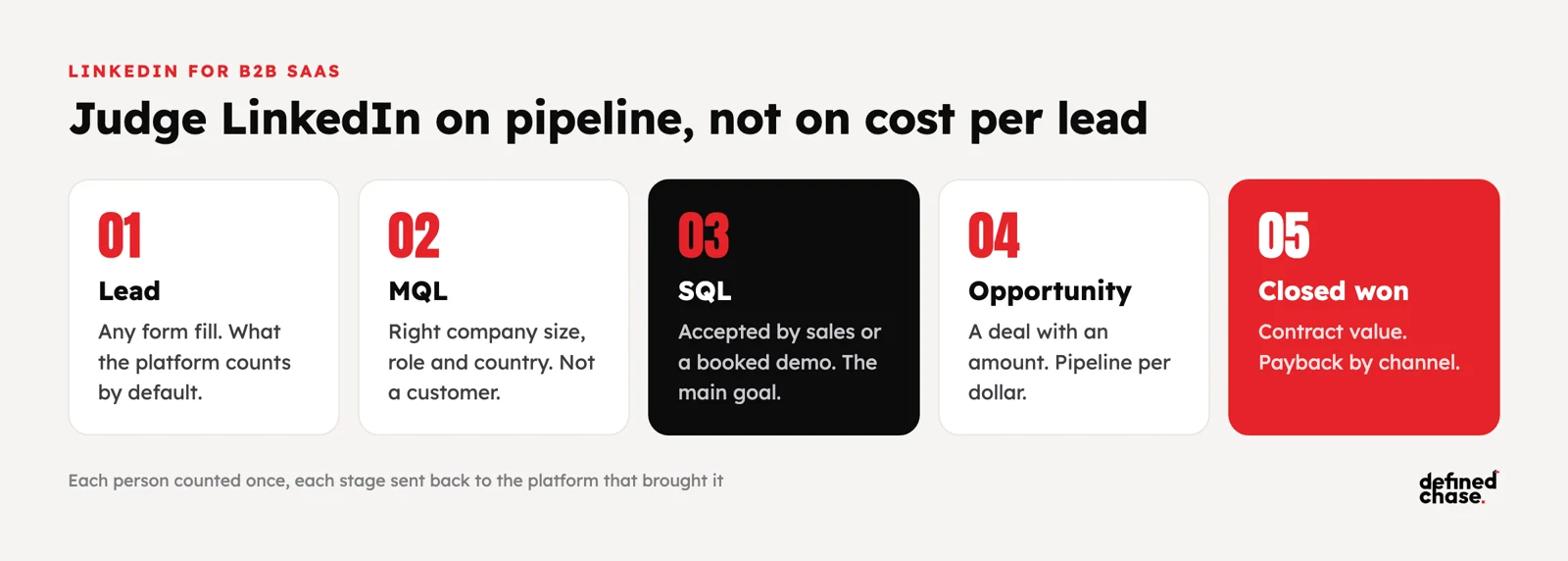
Short answer: LinkedIn ads work for B2B SaaS when you judge them on pipeline, not on leads. The platform counts form fills, so a cheap lead and a lead your sales team will never call look the same, and every tool in the stack counts the same person again. Fix that first: keep the LinkedIn click ID with each lead, count each person once in the CRM, and send the later stages (sales-qualified lead, opportunity, closed deal) back to LinkedIn through the Conversions API or the HubSpot or Salesforce integration. Then target a defined list of accounts and job roles, give the test at least one full sales cycle, and decide on cost per sales-qualified lead and pipeline per dollar, compared with Google and Meta on the same CRM numbers.
This guide is for B2B SaaS and B2B tech companies spending $100,000 or more a month on paid media, or planning to, where LinkedIn is the channel everyone argues about. Sales says the leads are bad. Marketing says LinkedIn is the only place the buyers are. Finance sees the highest cost per lead in the account. In 222 growth strategy calls with founders and marketing leaders, tracking nobody trusts came up 145 times and reporting 44 times, and in B2B those two problems meet on LinkedIn. If your conversion data is not trusted yet, read server-side tracking before you scale first.
What we hear about LinkedIn on growth strategy calls
B2B teams describe the same doubts in different words:
- “I’m definitely skeptical about reaching the technical people on LinkedIn. Let’s really keep an eye on that, so we don’t waste money.”
- “LinkedIn is a question. It doesn’t match.”
- “When we started laying out processes, we went back to the old, good Excel, because it wasn’t the CRM.”
- “We don’t really have a CRM. We have an Excel.”
The findings behind those quotes repeat too. One B2B SaaS team paused LinkedIn at 100 to 200 euros per conversion with no clear ideal customer profile. A telecom SaaS had HubSpot connected to Google and LinkedIn, but no events were sent back to the ad platforms, and most quote and demo forms were not tracked at all. On another account, offline conversion uploads were missing when the report was built, and adding them was expected to bring 50 to 100 extra purchases into the numbers. LinkedIn was rarely the real problem. The measurement around it was.
Why LinkedIn looks expensive and what to measure instead
LinkedIn clicks and leads cost more than on Google or Meta. That is the wrong comparison. What matters is what a lead turns into, and LinkedIn is the only one of the three where you choose the company, the job role and the seniority before you pay. The cost that counts sits further down the funnel.
| What the platform shows | What it hides | What to report instead |
|---|---|---|
| Cost per lead | Students, competitors, job seekers and existing customers count as leads | Cost per sales-qualified lead (SQL), from the CRM |
| Conversions | The same person counted as a form fill, a demo request and a CRM contact, sometimes by three tools | New people and new accounts, each counted once |
| Click-through rate | Clicks from outside the target accounts or roles | Share of spend and leads inside your account list |
| View-through conversions | Credit for buyers who would have converted anyway | Click-based pipeline, with view-through reported separately |
| Cost per conversion this week | Deals that close 30 to 90 days or more after the click | Pipeline per dollar over a full sales cycle |
On audits we have seen leads counted up to five times across the form tool, the CRM and the ad platforms. Once each person is counted once and only sales-qualified leads are sent back, the cost per lead goes up and the cost per real opportunity often goes down, because the algorithm stops buying cheap form fills.
Count each lead once: offline conversions for LinkedIn
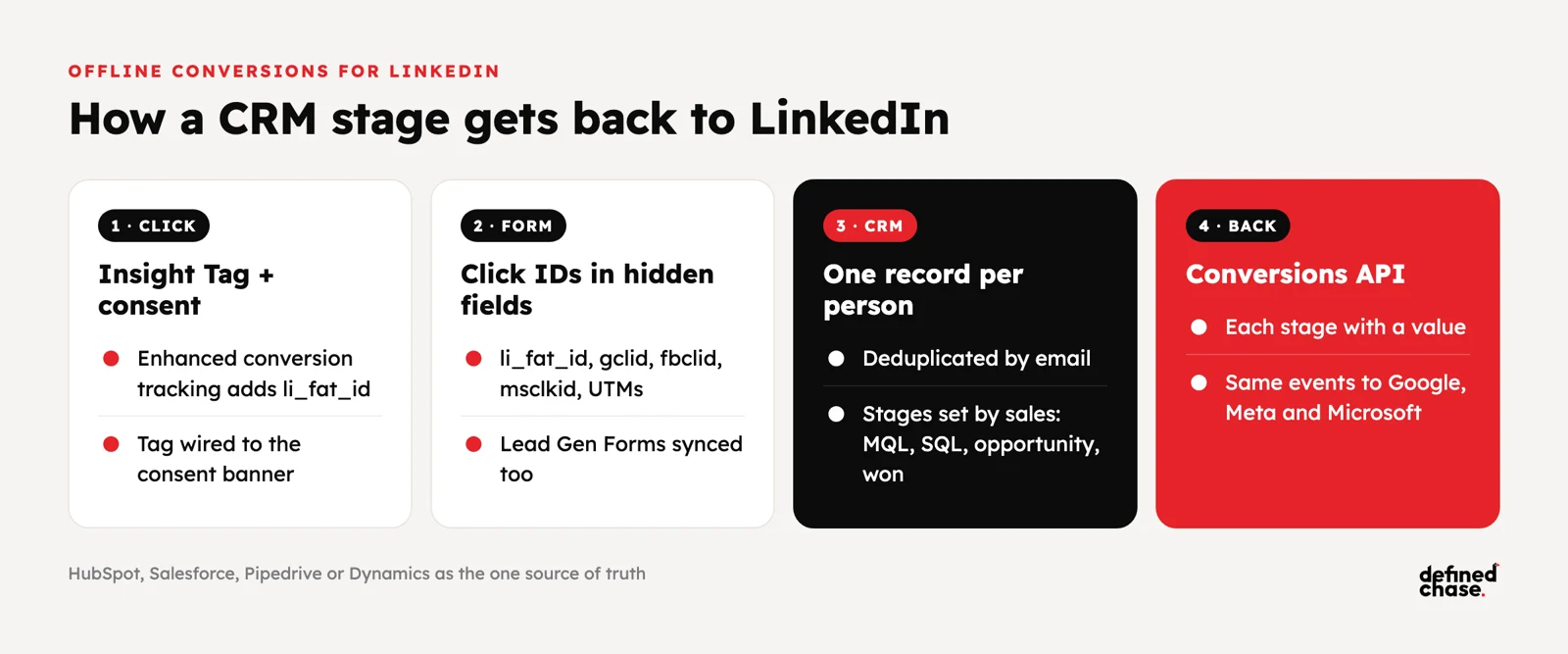
The fix is the same pipeline we build for Google and Meta, with LinkedIn added to it. A lead is stored once with its click IDs, the sales team moves it through stages, and each stage goes back to the ad platform that brought it.
| Stage | Who decides it | Send to LinkedIn as | Use it for |
|---|---|---|---|
| Lead (form fill or Lead Gen Form) | Automatic, after deduplication by email | Lead | Early learning while volume is low |
| Marketing-qualified lead (MQL) | Rules: company size, role, country, not a customer | Qualified lead | Filtering out spam and wrong-fit leads |
| Sales-qualified lead (SQL) or booked demo | Sales, in the CRM | Qualified lead or meeting, with a value | The main optimisation goal once volume allows |
| Opportunity | Sales, with a deal amount | Opportunity, with the pipeline value | Pipeline per dollar by campaign |
| Closed won | Sales | Purchase, with the contract value | Payback and budget decisions |
What you need to make it work:
- Click IDs kept to the CRM. The LinkedIn Insight Tag with enhanced conversion tracking adds a click ID (li_fat_id) to landing page URLs. Store it in a hidden form field next to the Google click ID (gclid), the Meta click ID (fbclid), the Microsoft click ID (msclkid) and the UTMs.
- Consent wired properly. The Insight Tag belongs in the same consent setup as GA4, Google Ads and the Meta Pixel. A visual cookie banner that does not control the tags gives you both missing data and legal risk.
- One CRM as the source of truth. HubSpot, Salesforce, Pipedrive or Dynamics, with defined lifecycle stages. A spreadsheet next to the CRM breaks the chain.
- Stages sent back automatically. LinkedIn’s Conversions API, either directly or through the native HubSpot or Salesforce connection, so a stage change in the CRM reaches LinkedIn without anyone uploading a file.
- Lead Gen Forms synced into the same CRM. Native LinkedIn forms convert well but skip your website, so they need their own sync and their own deduplication.
For the full tracking side, including consent and server-side events, see how we set up tracking you can trust.
Targeting and formats for B2B SaaS at scale
On LinkedIn the audience is the strategy. Start from a defined ideal customer profile: one or two segments, each with its company list, roles and messages. A pharma and biotech company, for example, would run research organisations and academic institutions as two separate segments with two separate messages. When the profile is vague, LinkedIn becomes the most expensive way to reach the wrong people.
| Format | Best job | When we use it |
|---|---|---|
| Thought Leader Ads (founder or expert posts) | Reach and trust with the buying group | Always on, from the first month, on a small share of budget |
| Single image and document ads | Problem and proof messages, gated or ungated content | Core prospecting to the account list |
| Video ads | Explaining the product, building retargeting pools | When the message needs a demo to make sense |
| Lead Gen Forms | Low-friction demo or content requests | When the CRM sync and qualification rules are in place |
| Conversation and message ads | Event invites, direct offers to warm audiences | Retargeting only, never cold |
Targeting rules we follow:
- Use a company list for account-based campaigns, and job function plus seniority rather than long lists of exact job titles.
- Exclude customers, competitors, your own employees and open job seekers where you can.
- Split segments when their sales cycle or deal size differs. One SaaS team we spoke with had e-commerce buyers closing in about 2 weeks and B2B buyers in about a month, with a higher deal value; one blended campaign would hide both.
- Keep LinkedIn and Google Search in the same plan. LinkedIn creates demand among the right accounts; search catches it when they look for a solution.
How to test LinkedIn without wasting a quarter
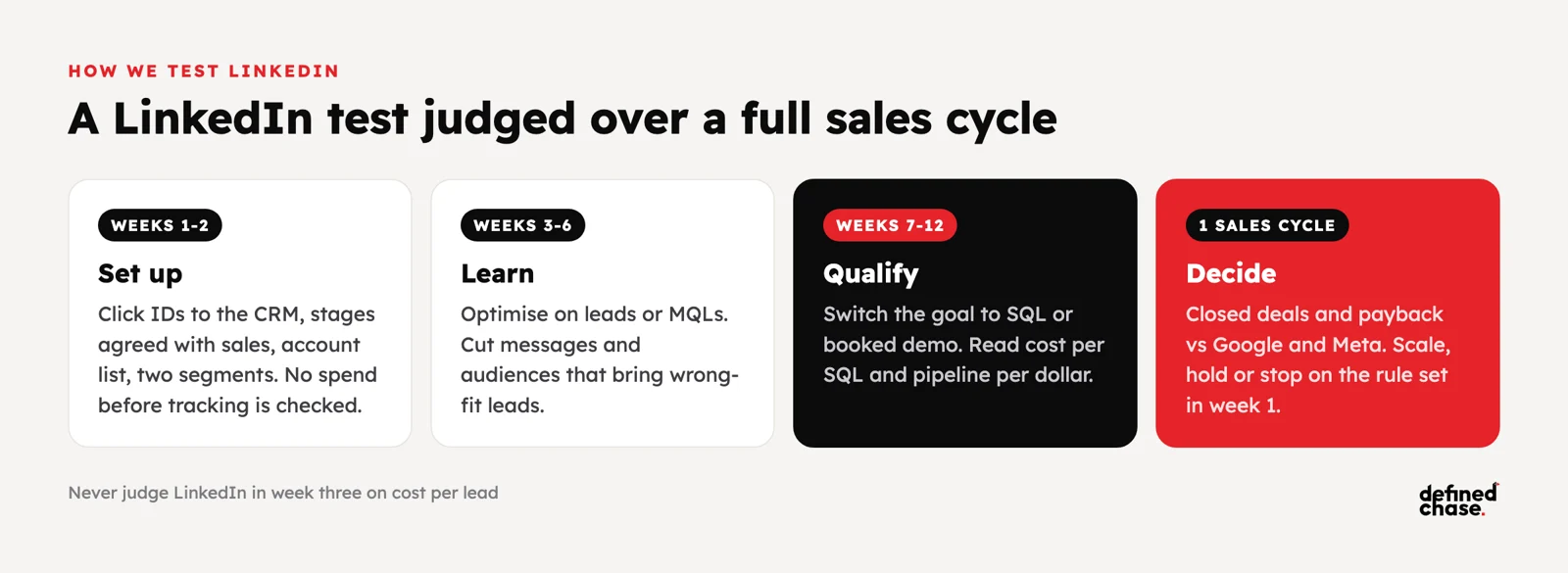
Most LinkedIn tests fail because they are judged in week three on cost per lead. Set the rules before the money goes out.
| Phase | What happens | What you decide |
|---|---|---|
| Weeks 1 to 2: set up | Click IDs to the CRM, stage definitions agreed with sales, account list and two segments built, Conversions API connected | Nothing yet; no spend before tracking is checked |
| Weeks 3 to 6: learn | Campaigns optimise on leads or MQLs; creative tested on two or three messages per segment | Cut messages and audiences that bring wrong-fit leads |
| Weeks 7 to 12: qualify | Switch the goal to SQL or booked demo once volume allows; read cost per SQL and pipeline per dollar | Compare with Google and Meta on the same CRM numbers |
| After one full sales cycle | Closed deals and payback by channel | Scale, hold or stop, on a rule agreed in week 1 |
One B2B SaaS account spending about 50,000 a month had three product lines at three to four times the cost per active client of the best one. The fix was not more LinkedIn or less LinkedIn. It moved 10,000 a month towards enterprise buyers with the total budget unchanged, and the company approved 30,000 more for the year. The decision was only possible because cost per active client was measured per product line, in the CRM, not per lead in the platform.
How to report LinkedIn to the CEO
The monthly page shows LinkedIn next to the other channels on the same backend numbers: spend, SQLs, cost per SQL, opportunities, pipeline value, closed won and payback. Brand and awareness spend, including Thought Leader Ads, is shown separately so it does not inflate or hide the cost per SQL. If you want to know whether LinkedIn creates demand that search later collects, run a geo or account holdout test rather than trusting view-through credit. See the one-page CEO marketing report and incrementality and marketing mix modeling for how.
How we run it at Defined Chase
We start B2B SaaS accounts with the pipeline, not the campaigns: click IDs from LinkedIn, Google, Meta and Microsoft kept to the CRM, lifecycle stages agreed with sales, each lead counted once, and SQLs, opportunities and closed deals sent back to every platform. Then we build LinkedIn around one or two defined segments and an account list, run it next to Google Search, and judge it on cost per SQL and pipeline per dollar over a full sales cycle, with the scale or stop rule written down before launch. One owner reads the weekly scorecard across all channels. See how we run paid media for SaaS and B2B companies, or book a free Growth Map Call to find where your pipeline leaks.
FAQ
Are LinkedIn ads worth it for B2B SaaS?
Yes, when the deal value is high enough to carry a higher cost per lead and the target buyers are defined by company and role. Judge it on cost per sales-qualified lead and pipeline per dollar, not on cost per lead.
What are LinkedIn offline conversions?
Stages that happen after the form fill, such as a qualified lead, an opportunity or a closed deal, sent from your CRM back to LinkedIn. They let LinkedIn optimise towards leads that become pipeline instead of any form fill.
What is the LinkedIn Conversions API?
A server-to-server connection that sends conversion events to LinkedIn from your server or CRM instead of the browser. It works next to the Insight Tag and is how CRM stages reach LinkedIn automatically, either directly or through the HubSpot or Salesforce integration.
How do I stop counting the same lead several times?
Store each person once in the CRM, matched by email, with the click IDs from the first visit. Report new people and new accounts from the CRM, and send only one event per stage per person to each platform.
How long should a LinkedIn ads test run?
At least one full sales cycle, usually 60 to 120 days for B2B SaaS, with the decision rule agreed before launch. Early weeks are for cutting wrong-fit audiences and messages, not for judging the channel.
Should we use LinkedIn Lead Gen Forms or send people to the website?
Both can work. Lead Gen Forms bring more leads at a lower cost, often of lower intent, so they need qualification rules and a CRM sync. Website forms bring fewer leads with more intent. Test both and compare on cost per SQL.
How does LinkedIn compare with Google Ads for B2B?
Google Search catches people already looking for a solution; LinkedIn reaches the right companies and roles before they search. Most B2B SaaS accounts at this budget need both, measured on the same CRM pipeline.
Updated 23 October 2026.
How we do this for clients: Google Ads agency →
Want to scale your ad spend?
On a free Growth Map Call we find what is capping your ad spend and the next 1 to 3 steps.
Attend a Growth Map CallRelated articles
Best TikTok ads agencies in Europe for brands spending $100K+ a month (2026)
A shortlist of TikTok ads agencies in Europe for brands spending $100K+ a month, five questions to ask, and where Defined Chase…
Nov 4, 2026 · 7 min readPerformance Max vs Search at scale: stop buying your own brand
At $100K+ a month on Google Ads, Performance Max and Search do different jobs. How to stop PMax buying your brand, control…
Oct 26, 2026 · 11 min readScale Meta Ads Past $100K a Month: Conversions API and Creative Volume
Why Meta stops scaling past $100K a month and how to fix it: Conversions API setup, event match quality, creative volume, kill…
Oct 21, 2026 · 11 min readQuick answers
Who offers performance-driven LinkedIn ads management for B2B SaaS pipelines?
B2B demand generation agencies such as Directive and paid media agencies with a SaaS practice. Defined Chase runs LinkedIn ads for B2B SaaS next to Google Search, sends SQLs, opportunities and closed deals from the CRM back to LinkedIn, and judges the channel on cost per SQL and pipeline per dollar rather than cost per lead.